
Phone Numbers
How to Search for and Purchase a Phone Number
Find a number by country, type, area code, or digits and buy it in one click.
Updated 9/17/2026
Find a number using the search filters, or simply click Search to browse what's available without narrowing anything down. 1. Go to Phone Numbers. 2. In Search Available Numbers, optionally set filters: Country (e.g., US United States), Type (e.g., Local), Area Code (e.g., 416), and Contains (specific digits you want in the number, e.g., 1234). 3. Click Search. Leaving the filters at their defaults and clicking Search still returns a list of available numbers. 4. Review the results table: each row shows the Phone Number, Region, Capabilities (Voice, SMS, MMS), and Monthly Cost (e.g., $1.00/month). 5. Click + Purchase next to the number you want. 6. The number is purchased immediately and appears in the Your Phone Numbers section at the bottom of the page.
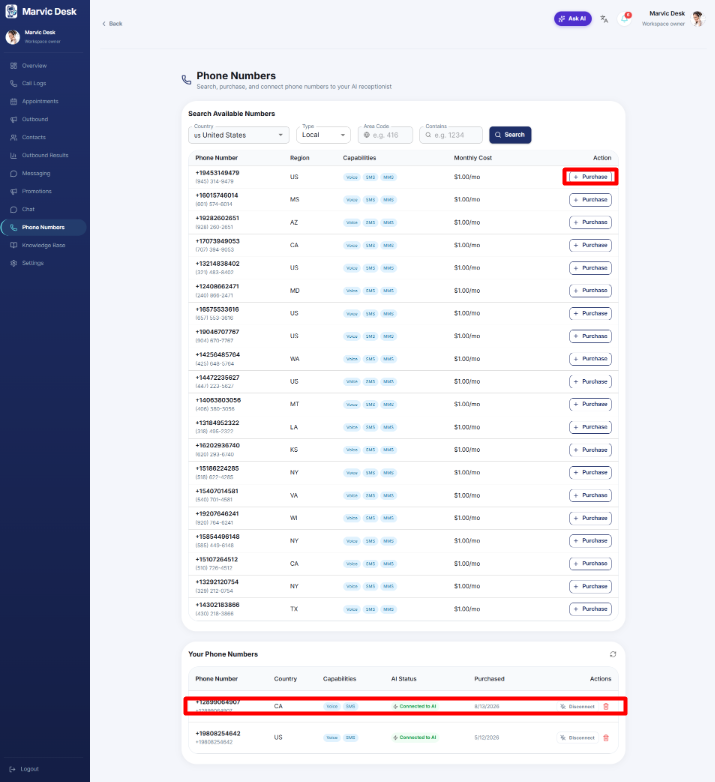
Note: A newly purchased number shows an AI Status of Not Connected until you connect it to an agent.